logo Sign In

The Phantom Menace - Streamlined (v2 finished and released) — Page 7

Author
Time

Dazman said:

Hey Phase, congrats on nearing completion of the edit! Must be a good feeling after all your work on it.

Cheers mate, much appreciated! I’m glad that the finish line is in sight haha!

If you really want to go OCD with this scene, the wide shot of Obi hanging in the lower left corner of the frame before climbing up also differs from those two shots. 😉

Ohhh man I missed that one! I just took a look, and you’re right - the position is different. I’ll take a look at correcting it.

Amazing! Are you manipulating one RGB color in the shot at a time? It would be interesting to hear about your process.

Yes, that’s right! Where necessary, I do shot-by-shot curves adjustments, then fine-tune it with small tweaks via other colour correction tools.
It gets a bit complex with the outdoor scenes. Since each exterior scene in the movie was shot over different days and times, with different lighting conditions, and across multiple takes, it’s not really possible to have one grade to cover the entire film (unless of course you add blanket red and blue tints to the whole movie to cover everything over, as was done in the home video releases…).

Once you remove the red and blue tints in the film, you very quickly see all of the different lighting conditions; it’s a bit of a mess when you remove the tints!

Anyway, count me in as interested in getting a link to the edit when you are done!

No problem! 😃

My fan-edits:

Fan Edit Central

IFDB

Author
Time
 (Edited)

With the colour grading, I have done a second pass, to further refine what I have done, and to remove as much of the red tint as I can.
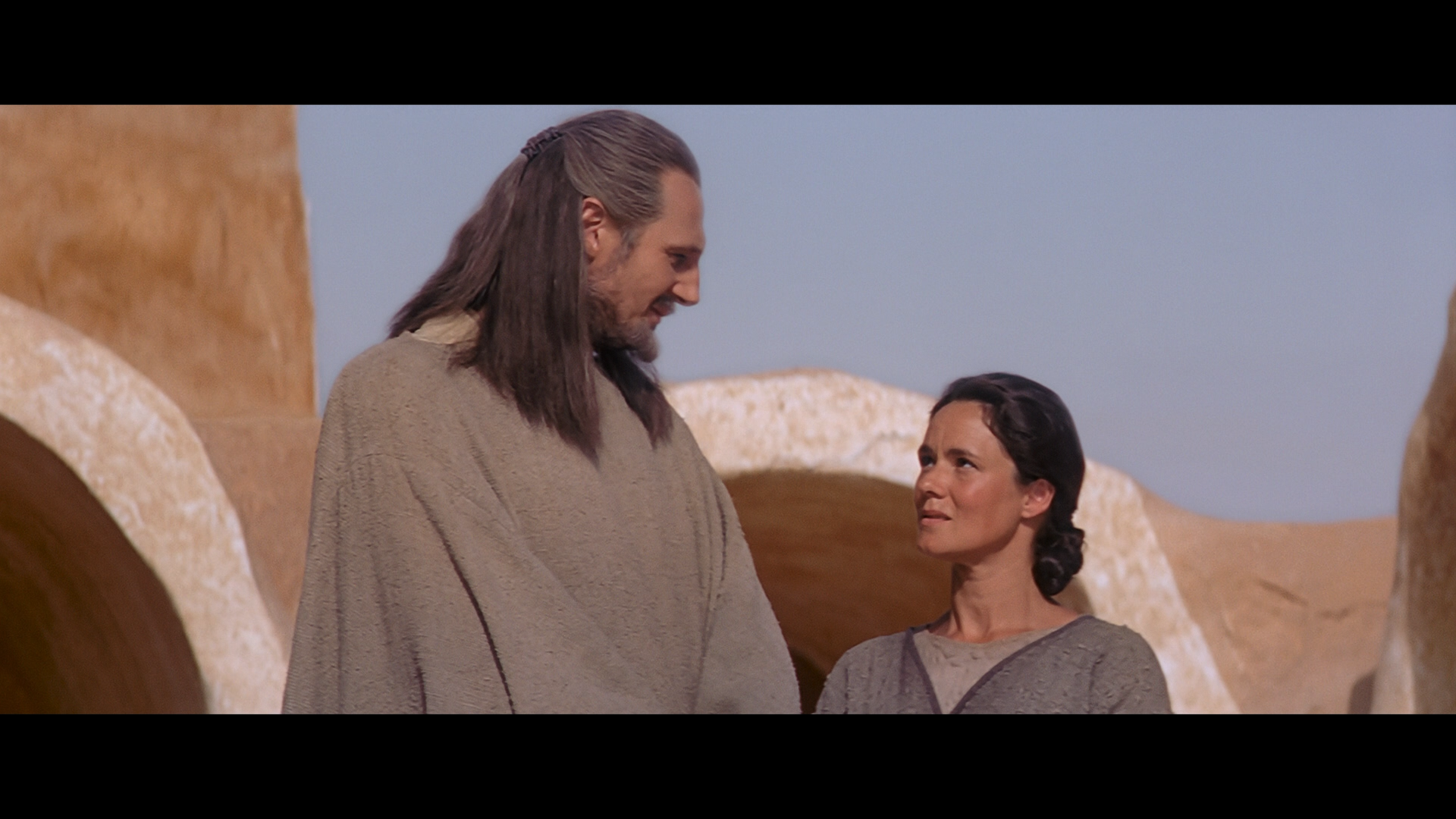
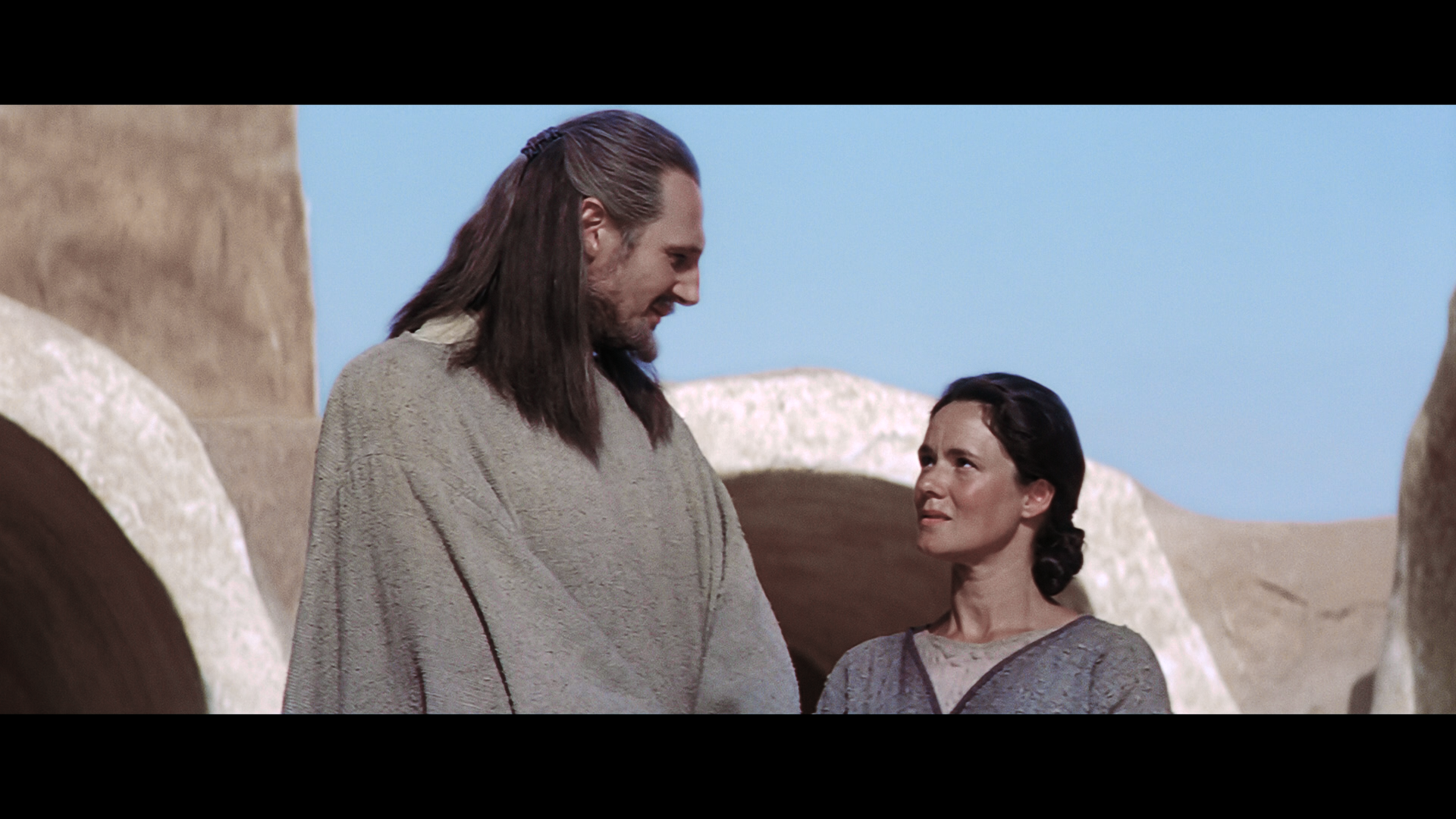
Here is an example of the updated colour correction I’ve done; I’m still refining it, but this gives you an idea of what I’m doing:

My fan-edits:

Fan Edit Central

IFDB

Author
Time

Are you aiming to make it look like it did on 35mm in regards to the colour grade? I definitely preferred that look over the blu ray, it’s just so much more … convincing?
Either way, while the change in colour is drastic, I am also super interested to see the other changes you have made to the movie, it sounds like the ideal version.

It sounds like you are planning on making similar treatments to II and III as well, am I understanding that correctly? Or have you already made those edits?

Author
Time
 (Edited)

Scratctong said:

Are you aiming to make it look like it did on 35mm in regards to the colour grade?

I’m aiming to do my own, unique colour grade, however in many ways it will resemble the original 35mm version.

It sounds like you are planning on making similar treatments to II and III as well, am I understanding that correctly? Or have you already made those edits?

AOTC was finished and has already been released; I’m planning to do an updated version, with some new VFX shots, plus some scenes and shots I want to revise, however it won’t be as in-depth (or take as long to do) as TPM though.
Here are details on the AOTC edit:
https://originaltrilogy.com/topic/Attack-Of-The-Clones-Streamlined/id/128047

ROTS hasn’t been finished yet; I’ve not worked on it for a while now, as I’ve been busy with other projects.

My fan-edits:

Fan Edit Central

IFDB

Author
Time

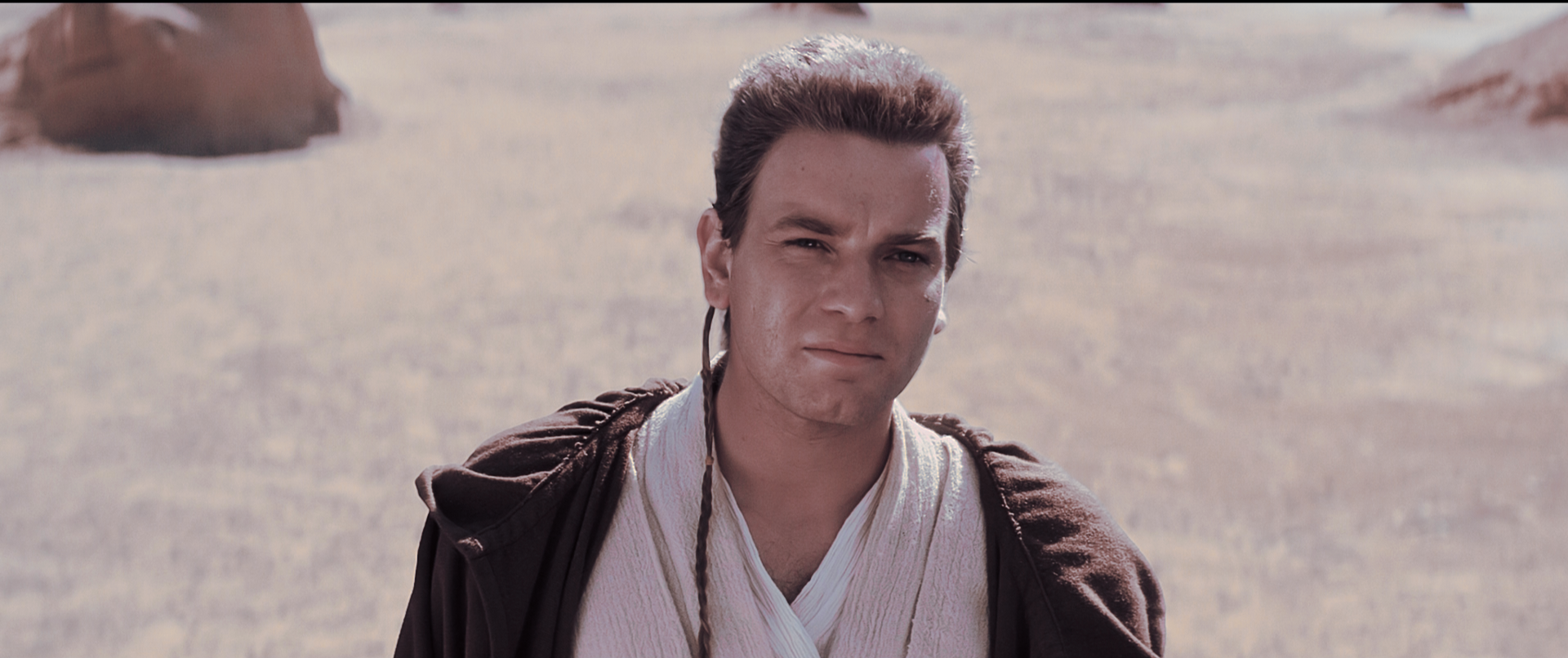
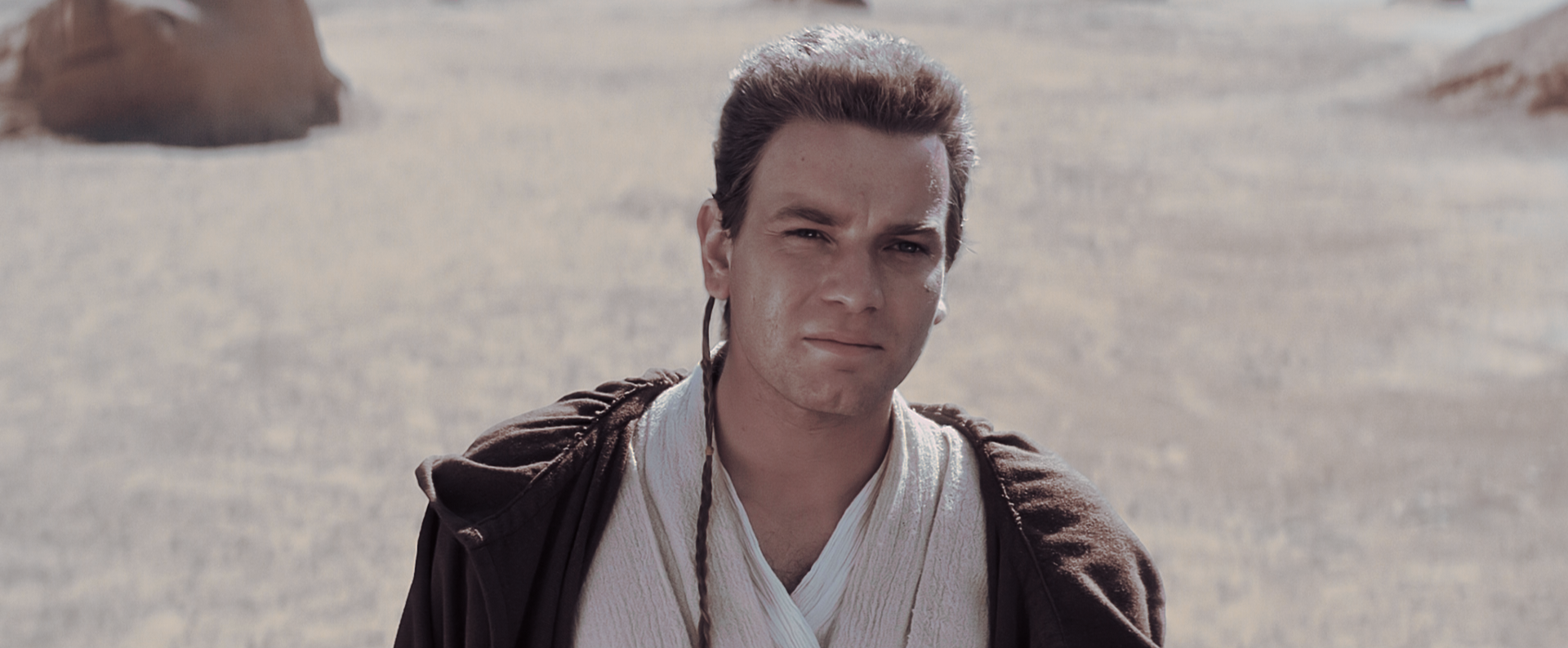
I’m still looking to improve and refine the colour grade; here is an example of some further refinements:

Original 2019 Blu-ray:

New colour grade:

My fan-edits:

Fan Edit Central

IFDB

Author
Time

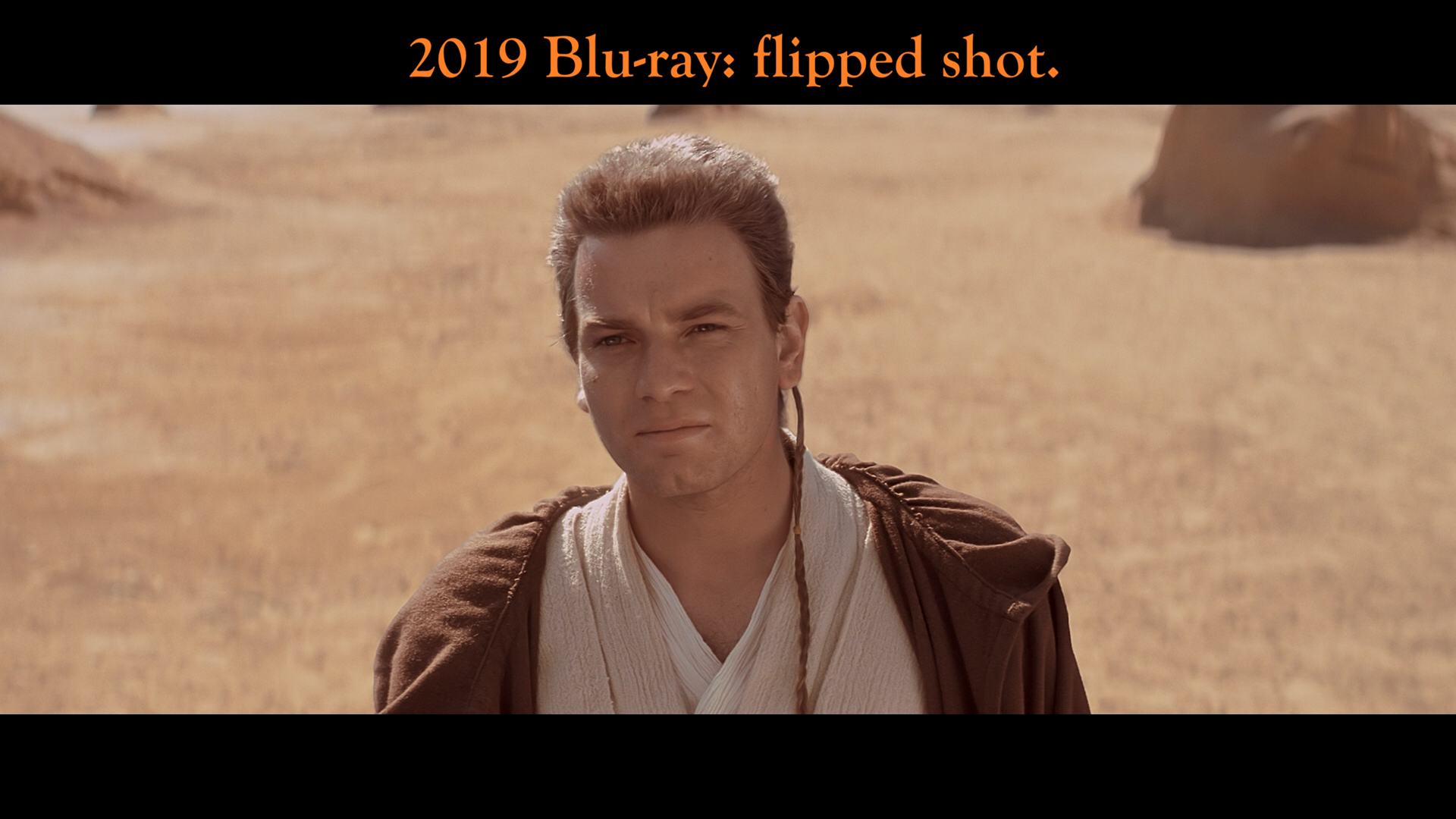
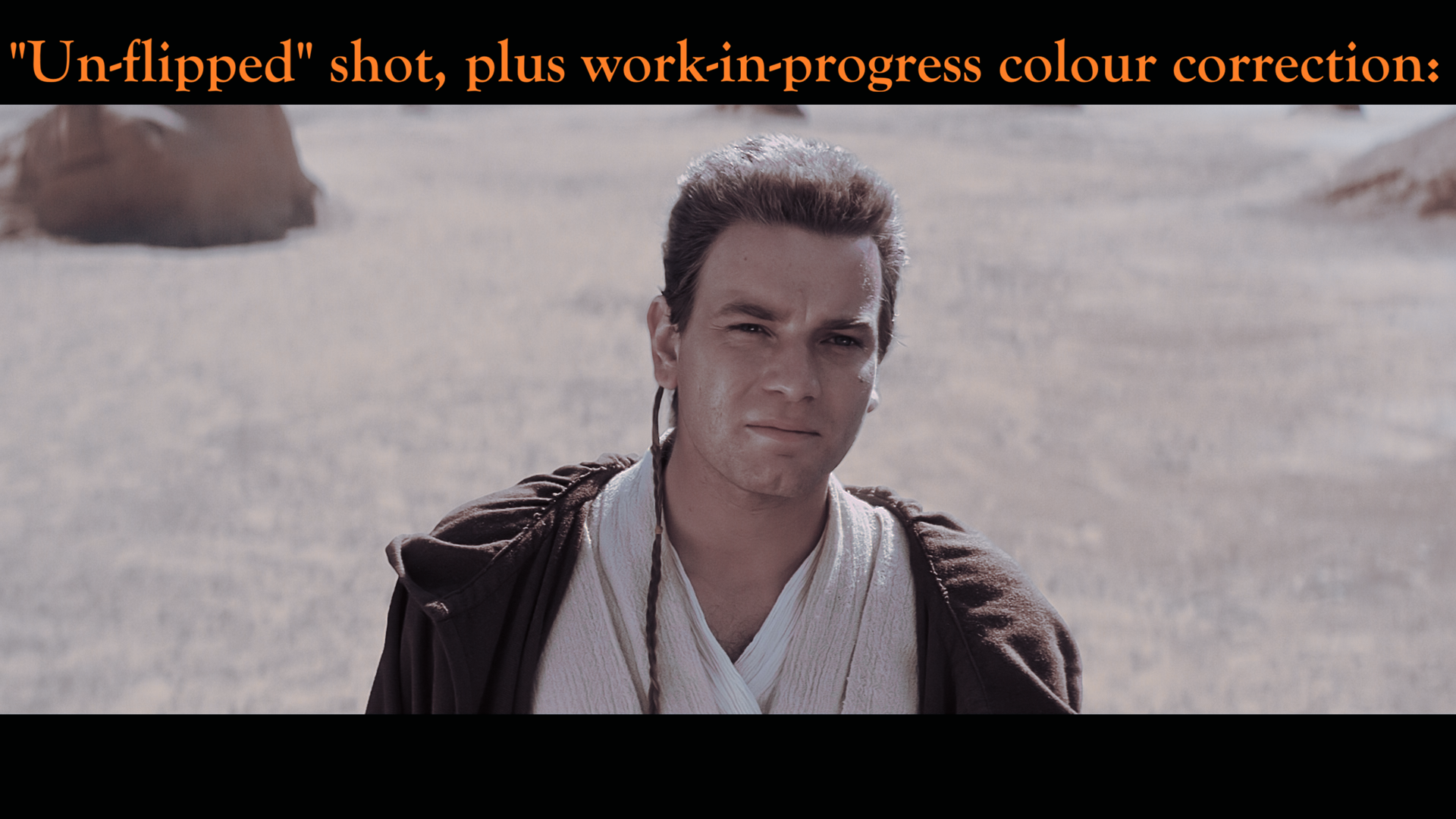
Some more work-in-progress colour correction pictures:
There are many flipped shots in TPM, this shot has been “un-flipped”, plus has some colour correction. Please note that these are work-in-progress shots — not the final version.

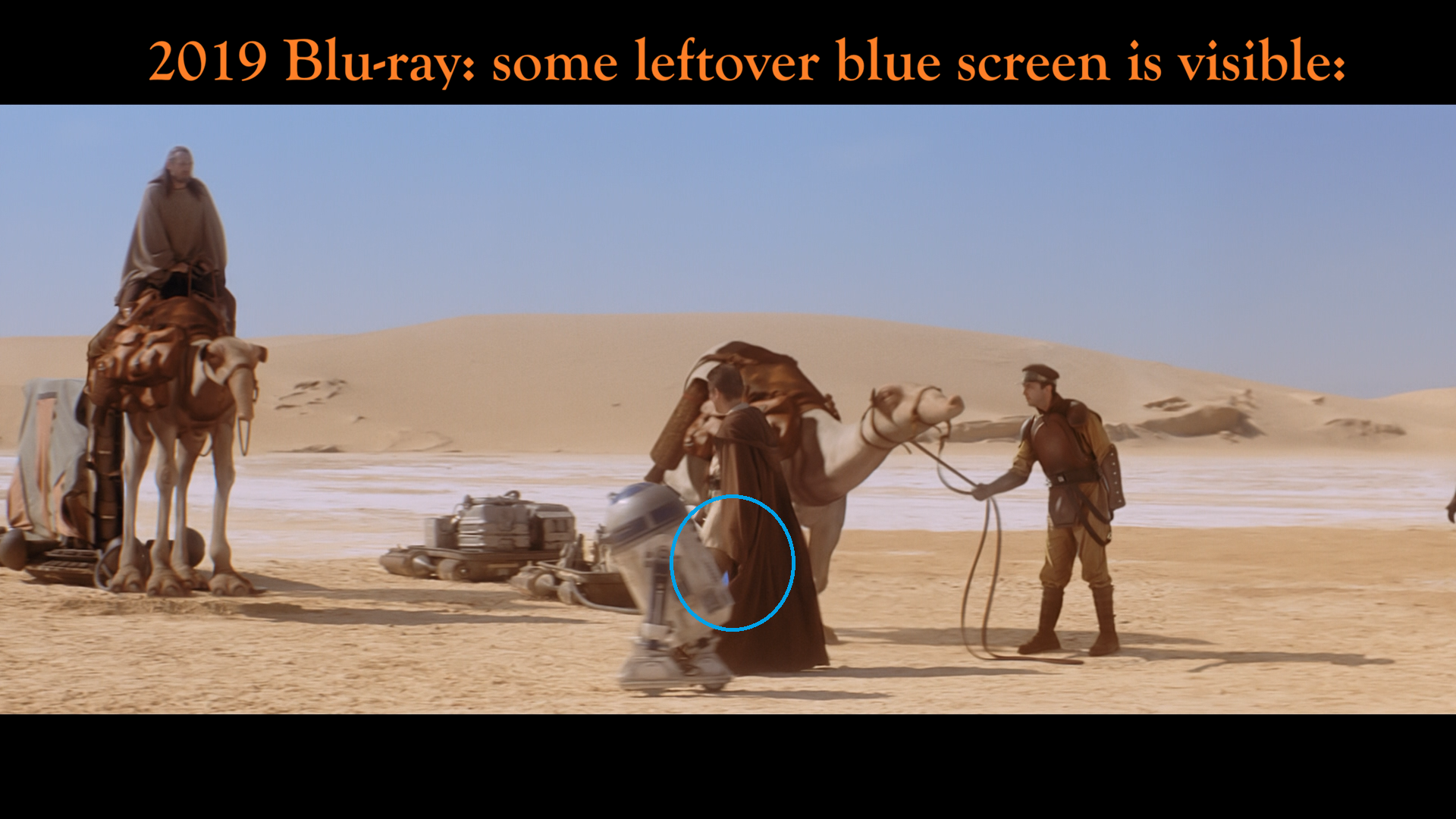
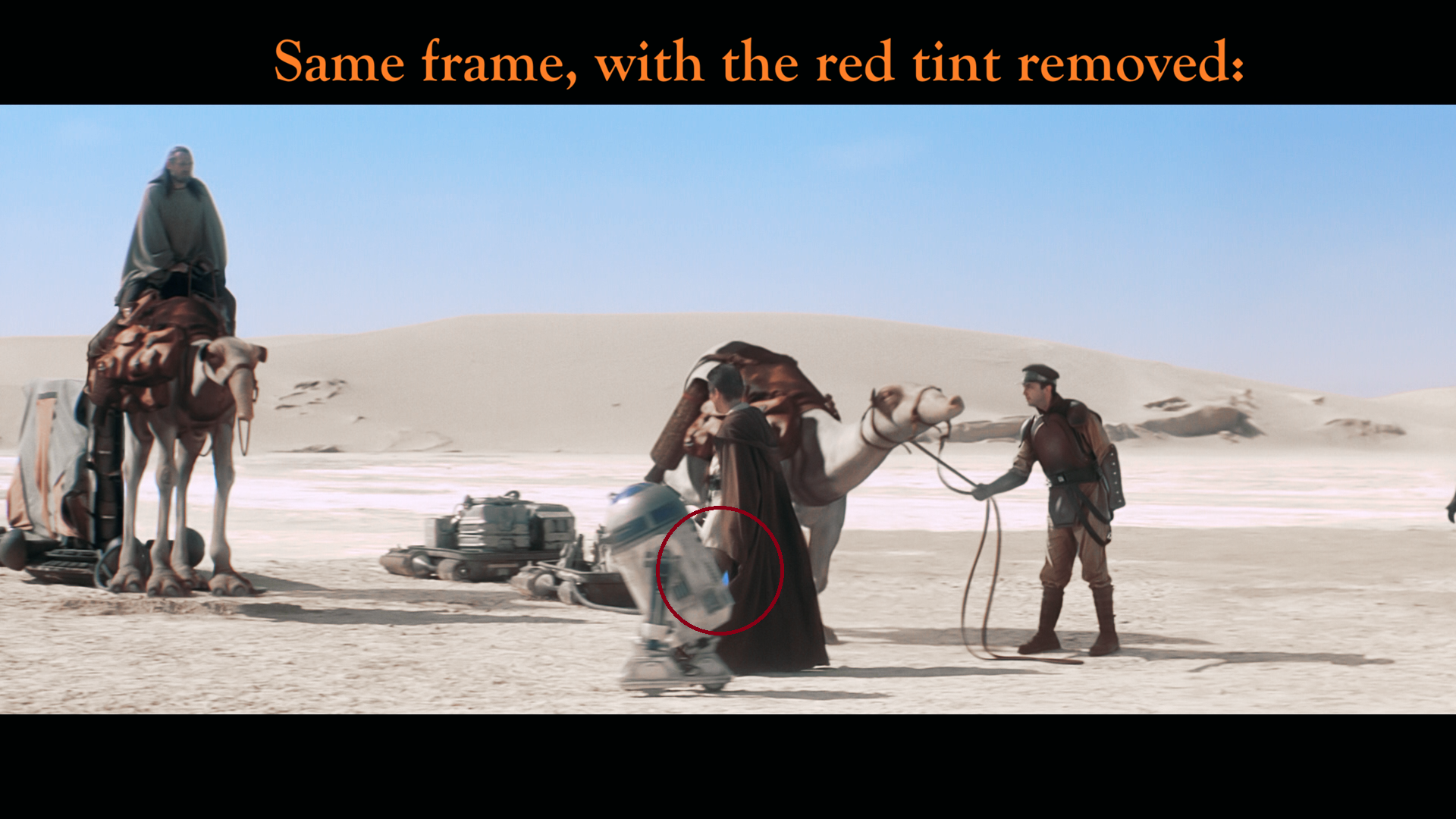
Unfortunately, I found yet more compositing errors, this time there is some leftover blue screen in-between Obi-Wan’s legs in this shot {I will fix this shot and remove the blue screen}:

My fan-edits:

Fan Edit Central

IFDB

Author
Time

The in-progress color correction looks a little intense, kind of reminds me of 2000’s horror movies haha. That could be an interesting edit, the whole Tatooine sequence as a slasher story with Maul as Jason Voorhees… maybe I’ll try that out one day.

I’m sure it just looks that way to me because of how much it contrasts the original. I love how the blue sky looks in the new grade!

Author
Time

Grand Admiral Thrawn said:

Yeah that Obi-Wan shot is a bit cold. Just tweak the temp, tint, and saturation a tad. Just a suggestion!

It’s all still a work-in-progress; I’m still refining the colours. 😉

I like what you did with the flesh tones, however the robes now have the red tint, which is precisely what I want to remove haha!

My fan-edits:

Fan Edit Central

IFDB

Author
Time

James.Quattro said:

I’m sure it just looks that way to me because of how much it contrasts the original.

Yeah, for sure! We are all so used to seeing TPM from either the VHS, DVD, LaserDisc or Blu-ray releases, which all have the red tint. Not seeing the red tint makes it look cold!

I love how the blue sky looks in the new grade!

Thanks! 😃

My fan-edits:

Fan Edit Central

IFDB

Author
Time
 (Edited)

Phase3 said:

I’m still looking to improve and refine the colour grade; here is an example of some further refinements:

Original 2019 Blu-ray:

New colour grade:

tbh I prefer your older grades, this one definitely is far too cold imo, especially ill fitting for Tatooine

Author
Time

NotTheDri0ds said:

tbh I prefer your older grades, this one definitely is far too cold imo, especially ill fitting for Tatooine

The previous colour grades still had some of the red tint in there, which I now want to remove much more of.

As I mentioned in the previous post, we’re so used to seeing the red tint, that without the red tint it may look unusual at first!
As I do the colour grading, I check the ‘scopes’ section in the editing software, to make sure that the colours are evenly balanced as much as possible.
What you’re seeing in these work-in-progress photos are one frame out of an entire sequence; once you watch the scene as a whole, it makes much more sense (and looks better than one single photo can show).

Either way, what I do may not appeal to everyone, and that’s okay too!

My fan-edits:

Fan Edit Central

IFDB

Author
Time

Seeing as how these unfinished, work-in-progress photos may have caused a bit of confusion, it’s probably best that I don’t post any more photos of my progress on the colour grading.
I’ll only post photos on VFX updates from now on.

My fan-edits:

Fan Edit Central

IFDB

Author
Time
 (Edited)

Phase3 said:

I like what you did with the flesh tones, however the robes now have the red tint, which is precisely what I want to remove haha!

Don’t be discouraged from posting! This one I removed the tint. Just upped the saturation and color temp a tad.


The Star Wars Saga:
I · II · III · IV · V · VI · VII · VIII · IX | Rogue One · Solo
What was first just a dream has become a frightening reality…

Author
Time

Grand Admiral Thrawn said:

Don’t be discouraged from posting!

Thanks for your kind words – it’s much appreciated! I didn’t want people to see work-in-progress still images out of context, and think that was the final version. Once people see the sequence as a whole, it makes much more sense.

I’m still working on the colours; removing the red tint and blue tint throughout the movie does make the film look very different - much more like how it was seen in cinemas back in 1999, as opposed to the last 27 years of home video releases on VHS, VCD, DVD, LaserDisc and Blu-ray, all of which have those tints added to them.

Today I have exported a 48-minute test clip (the first 48 minutes have initial colour grading, the rest hasn’t) to check for any audio or visual errors, and look for things that can be improved upon. There are a few things to adjust, however overall I’m happy with how it all looks.

This one I removed the tint. Just upped the saturation and color temp a tad.


I love what you’ve done! 😃
Upon reviewing the first 48 minutes of the edit, there are a few shots to adjust, including this particular scene. I’m still going to remove the red tint, however I want to adjust the colour of the sand, and make sure that there are proper flesh tones (and life) in Obi-Wan’s face.

My fan-edits:

Fan Edit Central

IFDB

Author
Time

A small update:

Upon reviewing how the first half of the movie flowed, I found one scene that slowed the pacing down somewhat, which I have now deleted.
In the original film, in the Trade Federation starship when the Jedi are holding their breath to avoid the poison gas, it goes from:
Jedi confronting and destroying the Battle Droids, with fantastic music >>> the film then slows down to a crawl, with no music, and a shot of the Neimoidians with some rather bland dialogue of “Seal off the bridge!” and so on >>> then the music starts up again, with the Jedi destroying more droids.

In order to improve the pacing, and maintain a sense of excitement and tension building up, I have deleted the scene of the Neimoidians.
Deleting this scene required a full audio rebuild (music, SFX and dialogue), so that now it flows as one continuous shot.

My fan-edits:

Fan Edit Central

IFDB

Author
Time

Amazing work bro! Would it be possible to see your original version of the phantom menace (from 2023?) I read every single edit you made and you nailed it. Definitely would like to watch that.

Thank you for your work.

Author
Time

Athena_walker said:

Amazing work bro! Would it be possible to see your original version of the phantom menace (from 2023?) I read every single edit you made and you nailed it. Definitely would like to watch that.

Thanks for your kind words!
I don’t have a copy of v1 of the edit.
When I decided to update it to v2, I deleted my copy of v1.

The original project file was deleted too; it was done on different software to what I use now, so I can’t replicate or export a fresh version of v1 – it’s gone!
V2 will be much better though – better audio, picture quality, upscaled deleted scenes, and new VFX.

My fan-edits:

Fan Edit Central

IFDB

Author
Time

For anyone interested in this project, here are some updates:
There is good news and bad news; first the bad news:

I’ve encountered several complex technical problems with one of the plugins I’m using in After Effects, specifically for the replacement Lightsaber blades. Apparently it’s a well-known issue (which I had never heard of before…), however fixing it is another issue.
So far, this only affects the replacement blades on the Tatooine duel sequence. This has drastically slowed down my progress; the workaround solution I’m using will add at least two or three weeks to the editing time to complete the scene.
Hopefully this won’t affect the replacement blades on the Naboo duel sequence; I will find out later today if that’s the case or not.

The good news:
In order to not get stuck fixing the problems with the plugin, I moved forward with making more small trims & cuts, and colour grading the rest of the film. After the Tatooine section of the film, this has been going extremely well; I’m actually quite shocked at how well it’s going haha! I’ve encountered zero problems — I’m hoping that it stays that way!
I’m currently up to 01:18:00 in the edit, which corresponds to 01:52:46 in the 2019 Blu-ray (Padme, Panaka and the Naboo soldiers about to confront Battle Droids in the palace).

My fan-edits:

Fan Edit Central

IFDB

Author
Time

Phase3 said:

Athena_walker said:

Amazing work bro! Would it be possible to see your original version of the phantom menace (from 2023?) I read every single edit you made and you nailed it. Definitely would like to watch that.

Thanks for your kind words!
I don’t have a copy of v1 of the edit.
When I decided to update it to v2, I deleted my copy of v1.

The original project file was deleted too; it was done on different software to what I use now, so I can’t replicate or export a fresh version of v1 – it’s gone!
V2 will be much better though – better audio, picture quality, upscaled deleted scenes, and new VFX.

Great! Please feel free to share the version you have available. So eager to see it.

Thank you for your work.

Author
Time

Phase3 said:

For anyone interested in this project, here are some updates:
There is good news and bad news; first the bad news:

I’ve encountered several complex technical problems with one of the plugins I’m using in After Effects, specifically for the replacement Lightsaber blades. Apparently it’s a well-known issue (which I had never heard of before…), however fixing it is another issue.
So far, this only affects the replacement blades on the Tatooine duel sequence. This has drastically slowed down my progress; the workaround solution I’m using will add at least two or three weeks to the editing time to complete the scene.
Hopefully this won’t affect the replacement blades on the Naboo duel sequence; I will find out later today if that’s the case or not.

The good news:
In order to not get stuck fixing the problems with the plugin, I moved forward with making more small trims & cuts, and colour grading the rest of the film. After the Tatooine section of the film, this has been going extremely well; I’m actually quite shocked at how well it’s going haha! I’ve encountered zero problems — I’m hoping that it stays that way!
I’m currently up to 01:18:00 in the edit, which corresponds to 01:52:46 in the 2019 Blu-ray (Padme, Panaka and the Naboo soldiers about to confront Battle Droids in the palace).

Have you tried da Vinci’s moving mask for making lightsabers?

Author
Time

HobbIt_Yoda said:

Have you tried da Vinci’s moving mask for making lightsabers?

The Lightsaber VFX was finished a few months ago – the issue isn’t about creating new VFX shots, it’s about how both After Effects and Premiere Pro then processes data from certain plugins.
I haven’t used Resolve, as I use After Effects and Premiere Pro.

My fan-edits:

Fan Edit Central

IFDB

Author
Time
 (Edited)

Phase3 said:

HobbIt_Yoda said:

Have you tried da Vinci’s moving mask for making lightsabers?

The Lightsaber VFX was finished a few months ago – the issue isn’t about creating new VFX shots, it’s about how both After Effects and Premiere Pro then processes data from certain plugins.
I haven’t used Resolve, as I use After Effects and Premiere Pro.

I do all my sabers in AE with video copilot’s saber plugin its amazing and bullet proof…pretty much made for starwars…If you need any help let me know. I also need the sabre fix for Menace where Maul fight fights on tatooine. I was holding out for your work, but can certainly bang those shots out so you can focus on other things. Not sure if that is the scene you are working on or another, but let me kno. Even with this plugin there are definately little tricks that are required to pull of sabres in motion…reach out any time

Author
Time

kg1977 said:

I do all my sabers in AE with video copilot’s saber plugin

I’m also using the Saber plugin.

its amazing and bullet proof…

Amazing: yes.
Bulletproof: sadly, no.
There are known issues with how After Effects and Premiere Pro processes certain types of data (luminance data being one of them) from various plugins, with Saber being one of the affected plugins.

If you need any help let me know.

Thanks very much, but unless a person is a software engineer or programmer for Adobe, and can quickly update After Effects, there is no quick, simple fix.

I have a workaround solution; it will add a few weeks of extra work, but I will finally be able to export a video with the revised Lightsabers.

I also need the sabre fix for Menace where Maul fight fights on tatooine. I was holding out for >your work,

As I mentioned in a previous post, the VFX work has been done.
The revised Lightsabers for the duel on Tatooine was finished a few months ago — it’s complete!

The issue isn’t about creating the VFX, it’s about how both After Effects and Premiere Pro then processes the data from the Saber plugin.

Even with this plugin there are definately little tricks that are required to pull of sabres in >motion…reach out any time

Cheers mate; unfortunately, there are many quirks, anomalies and odd problems with the Saber plugin. It’s far from perfect…

Thankfully the actual VFX shots are done, so I won’t need to do them again – I am in the process of getting the associated video ready for export.

My fan-edits:

Fan Edit Central

IFDB

Author
Time

A quick update:
Some good news!
I checked the revised Lightsaber VFX for the duels on Naboo, and there were no problems at all; I have tidied up some of the rotoscoping, to make some shots look better, and blend in better with the original footage.
It seems that the luminance and export issues with the Saber plugin are only affecting the Tatooine scenes, however I will sort all of that out soon.

Next up, I will revise the shot of Obi-Wan hanging from the ledge on Naboo. Dazman here on the forums pointed out a continuity error in the orignial film, which will be relatively simple to fix.
After that, I will finish off the Tatooine duel issues.

My fan-edits:

Fan Edit Central

IFDB