logo Sign In

The Phantom Menace: Cinelegacy Edit

Author
Time
 (Edited)

Hello there!

I’d finally like to present a project of my own that’s been on my mind for quite some time:
What is the Cinelegacy edit?
The original theatrical version of The Phantom Menace is very close to my heart. I saw the movie in theaters 19 times back then, so I can still remember quite clearly what the colors originally looked like. I want to recreate that experience as faithfully as possible - for myself and for many others who are interested. It will be a color regrade and fan edit that, true to its name, stays as close as possible to the original theatrical release.

To make things short: THE CINELEGACY EDIT will be a THEATRICAL RECONSTRUCTION based on the official UHD, trying to rebuild the nostalgic 35mm film print aesthetics/feeling as much as possible.


As we all know, the current official versions (streaming, Blu-ray, UHD) are an absolute disaster - in my opinion, one of the worst releases ever. I won’t go into detail about the flaws here; they are well known (DNR from hell, terrible color grading).
Another issue is the absence of the original theatrical cut. I find the new scenes added for the DVD/Blu-ray releases to be awful; they always stand out starkly against the rest of the film. Not to mention that many of the new scenes consist of stupid jokes and—especially in the case of the podrace—drag on far too long.
I’m also likely in the absolute minority on this point: I like the old Yoda puppet. Yes, it bears little resemblance to the classic Yoda we knew from the original trilogy. Still - probably for nostalgic reasons—it’s simply an integral part of the original version for me.

The first two releases will be a GERMAN version and an ENGLISH version.


SOURCES:

  • Official UHD version as the base for the film
  • schorman’s phenomenal theatrical cut for the Yoda scenes, the cut Coruscant footage, and some of the podrace scenes
  • Original theatrical DTS audio tracks in German and English

PROCESS:

  • New more authentic 35mm film print color grading, using many different sources
  • New burned-in subtitles closer to the 35mm film print
  • edited to match the original theatrical cut
  • removing DNR to the best extent possible, combined with image sharpening
  • adding fine film grain
  • adding minimal filmprint dirt and scratches to give that nostalgia feeling (you won’t notice until you look very close)

Please note: This project will be a shot-for-shot regrade, meaning I will be dedicating close attention to every single scene. This also means the project will take time to complete. So please be patient with me 😉

Best regards
Roobyoo

Author
Time

Great stuff. Yes, this is exactly what I remember from when I was a kid. I always thought the re-releases looked way too cold.

Author
Time

I programmed a tool that takes two input videos and generates a new, color-graded version based on the first source. For example, the first source is a 35mm print scan which colorgrade I want to lay on another source, in this case the UHD of The Phantom Menace, and the goal is that the final output has the 35mm grading on the best available official source of the movie. The tool is still a work in progress, and the output will just be the base for further adjustments.
Initially, I tried to automate the color-matching process for entire scenes, but the results weren’t satisfying. I subsequently added a feature that requires the user to manually select the scenes. This doesn’t take very long, and the results were immediately much better.
I know that Dre’s color correction tool is a very powerful one, but I wanted to do something on my own, with a more modern visual user interface.

https://www.youtube.com/watch?v=YimeLpWeS30

https://www.youtube.com/watch?v=TsLlidqvIqg

Author
Time

Roobyoo said:

I programmed a tool that takes two input videos and generates a new, color-graded version based on the first source. For example, the first source is a 35mm print scan which colorgrade I want to lay on another source, in this case the UHD of The Phantom Menace, and the goal is that the final output has the 35mm grading on the best available official source of the movie. The tool is still a work in progress, and the output will just be the base for further adjustments.
Initially, I tried to automate the color-matching process for entire scenes, but the results weren’t satisfying. I subsequently added a feature that requires the user to manually select the scenes. This doesn’t take very long, and the results were immediately much better.
I know that Dre’s color correction tool is a very powerful one, but I wanted to do something on my own, with a more modern visual user interface.

https://www.youtube.com/watch?v=YimeLpWeS30

https://www.youtube.com/watch?v=TsLlidqvIqg

Will you share this program? Because this is magic

Star Wars, Paleontology, Superhero, Godzilla fan. Darth Vader stan. 23. ADHD. College Student majoring in English Education.
My Star Wars Fan-Edits

Author
Time
 (Edited)

Of course. My goal is to make it much more easier and quickier for others to apply their favorite existing grades of older releases (e.g. prints, VHS, Laserdiscs, DVD, etc.) to modern releases.

New example with added german subtitles:

https://www.youtube.com/watch?v=5H0amMMUM0Y

Author
Time

I was trying to do something similar but it sounds like you’re giving this an attention to detail beyond what I was prepared to put into it. Eagerly awaiting the results!

Author
Time

Thank you.

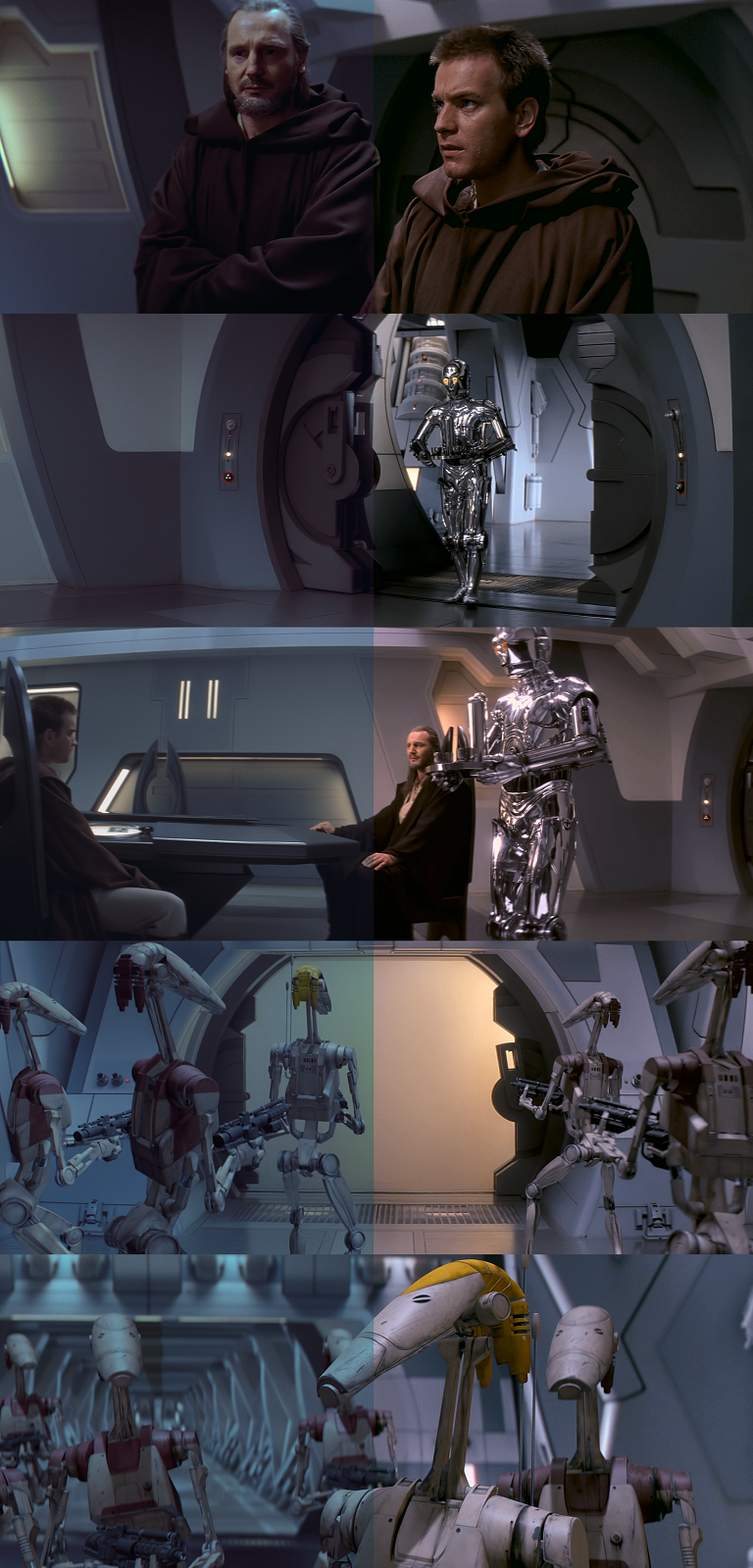
Today my eyes had to suffer once again through what kind of abomination they did to the home media release of this movie. The bluish filter is just unbearable. It is okay in some (not many) Naboo and Tatooine scenes - but at the beginning of the movie, it’s really awful.

Left: official release | Right: Cinelegacy Regrade (not final)

Author
Time

This looks fantastic. I’ve been wanting a good “theatrical” looking version of TPM with the original podrace and without those unfinished looking extra scenes. Will keep an eye on this, vielen dank!

Author
Time

this looks good… wait 19 times on a theaters

idk